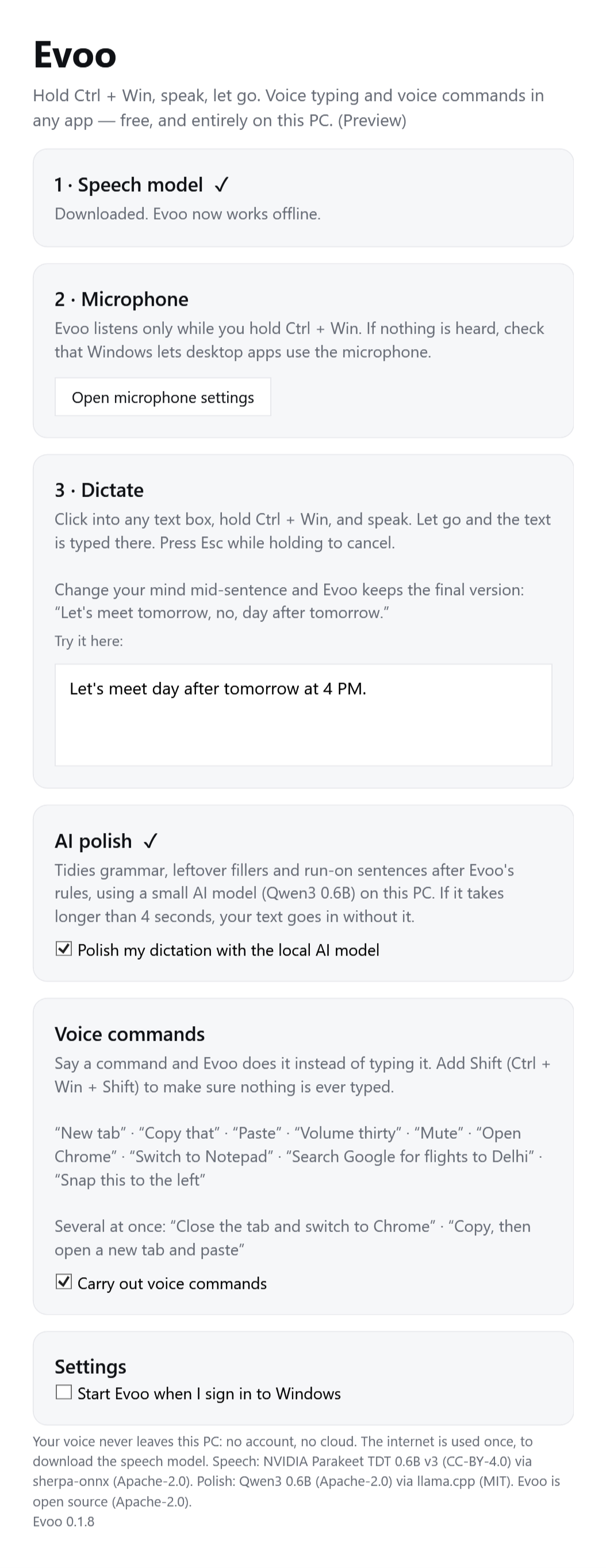
Let's meet day after tomorrow at 4 PM.
Dictate anywhere
Hold Ctrl + Win in any text box and speak. Change your mind mid-sentence and Evoo keeps the final version.
Evoo is voice dictation for Mac — and now Windows — that fixes your self-corrections, formats lists, and learns your names. In any app, with no account and nothing sent to the cloud.
Mac: Apple Silicon (M1 or newer) · macOS 14+ · one-line install · Windows 10 and 11 (preview)
What it does
Most dictation writes down every word. Evoo writes what you meant — then gets out of the way.
Change your mind mid-sentence. Evoo keeps the final version.
Items become bullets, steps become numbered lists — Markdown where it fits, plain text elsewhere.
Reads names on screen while you speak and remembers words you correct.
Open apps and sites, control volume and media, press keys, move windows, click buttons — and chain them: “close the tab and switch to Claude”.
Listens to a lecture and jots down what matters — formulas, definitions, what's on the exam. Edit as it writes.
Evoo notices how you edit what it typed and starts writing your way. With enough edits it trains a personal model overnight, on your Mac.
Select any text, hold fn, and say what to change. Works in every app.
Add reminders and calendar events, save notes, or search what you said before — by meaning.
Voice commands
Add Control to give a command instead of dictating — and say several at once. Evoo runs them in order and shows each step.
Hold fn ⌃ control and say:
New, in preview: say it your own way. An optional on-device model (290 MB, built on Google's FunctionGemma) works out what you mean — “it's too bright in here”, “I'm done with Safari”, “email Priya about the offsite”. It gets about four in five unseen phrasings fully right, so it only runs in command mode and never types what it didn't understand. Turn it on in Settings.
Speed
Evoo transcribes while you pause, so the text is usually ready the moment fn comes up. Measured on an 8 GB M1.
Our own model
Evoo now polishes with a model we trained for exactly this job. We fine-tuned Qwen3‑0.6B on 43,000 dictations, real speech and everyday messages read aloud and transcribed by the same speech model Evoo uses. It runs on your Mac, after Evoo's rules.
Repeats and false starts go; your words stay.
A change of mind keeps only the final version.
A dictated question or request is typed as you said it.
Weights, examples and every test result are public, under Apache‑2.0.
Install
Evoo is free and open source, so it isn't signed with a paid Apple certificate. That means macOS asks you to confirm it once. The one-line install skips that step entirely.
Open Terminal (press ⌘ Space, type “Terminal”), paste this, and press Return. It downloads the latest version, verifies it, installs it to Applications and opens it — no warning.
$ curl -fsSL https://raw.githubusercontent.com/chndr-prksh/evoo/main/install.sh | bashWant to see what it runs first? Read install.sh — it's short.
Or clear the warning in Terminal instead:
$ xattr -dr com.apple.quarantine /Applications/Evoo.appEvoo's welcome tour walks you through this and ticks each step off as you go — then one click on Set up & continue downloads the local AI model and turns on the recommended settings. No trip to Settings needed.
System Settings › Keyboard → “Press 🌐 key to” → Do Nothing.
So Evoo can hear you. Only while you hold fn.
So Evoo can notice when fn is pressed.
So Evoo can paste at your cursor and read names on screen.
The first launch downloads the speech model (~0.5 GB) once; the optional local AI model (2.5 GB, for class notes, rewrite and polish) downloads in the background during setup. After that Evoo works offline and updates itself — look for Install Update in its menu.
Windows · Preview
Dictate, give voice commands and polish your words with AI — all on the PC, in any app. The pictures below are the real app.
Windows 10 or 11, 64-bit · 90 MB · free
Let's meet day after tomorrow at 4 PM.
Hold Ctrl + Win in any text box and speak. Change your mind mid-sentence and Evoo keeps the final version.
Say what to do — one thing or several. Evoo runs each step in order and shows it. Add Shift to make sure nothing is typed.
The launch is actually going fine, and we just need to test the payment page.
An optional small AI model tidies grammar and leftover fillers after Evoo's rules. It runs on your computer; if it takes over 4 seconds, your text goes in without it.

Source code · Speech: Parakeet v3 · Polish: Qwen3 0.6B · both run on your PC
Privacy
Speech recognition, corrections and the optional AI all run on your Mac's own chip.
FAQ
Yes. No subscription, no trial, no account. It's open source under Apache-2.0, and every model it uses is free and open-weight.
That message appears for every app not signed with a paid Apple developer certificate — it doesn't mean anything was detected. You can read all of Evoo's code on GitHub, releases are built there automatically, and the one-line install checks the download's checksum. Evoo only goes online to download its models and check GitHub for updates.
Both. Besides fillers, self-corrections and grammar, it fixes words the speech model misheard when the meaning makes it obvious — “Jack and Gill went up the hell” becomes “Jack and Jill went up the hill”, “I need to by milk” becomes “I need to buy milk”. On Macs with 16 GB or more it also reads the sentences you said just before and the text already in the box, so it knows the topic. It never changes a word that already makes sense, and it all runs on your Mac.
Evoo's own polish model: Qwen3‑0.6B fine-tuned on 43,000 dictations so it turns what the speech model wrote into what you meant, without answering or adding anything. Pick it in Settings › Smart cleanup › Model. It runs after Evoo's rules, entirely on your Mac. The weights, test sentences and results are on Hugging Face.
Yes, as a preview: download it here. Hold Ctrl + Win, speak, and let go. It has the same on-device speech model and correction rules as the Mac, plus voice commands (including several in one breath) and optional AI polish, on 64-bit Windows 10 or 11. Windows SmartScreen will warn about it because the build isn't code-signed yet. Lists, number formatting and other languages are Mac-only for now.
Apple Silicon Macs (M1 or newer) with macOS 14 Sonoma or later. 8 GB of memory is enough for dictation; 16 GB gives the optional local AI (rewrite, reply, Class Notes) more room.
Anywhere you can type: Chrome, Safari, Slack, WhatsApp, Gmail, Notion, Notes, Word, VS Code, Cursor, Terminal and more. It formats for each — Markdown in editors, plain bullets in chat, and never a line break in Terminal.
Yes, but don't run two fn-based dictation apps at once; both will react to the key. Set Keyboard › Press 🌐 key to › Do Nothing so Apple's dictation doesn't pop up too.
Yes. Drag it anywhere along the bottom of the screen, or up the left or right side, where it stands upright. Or pick a spot in Settings › Pill position. It remembers where you left it.
Turn on Settings › Keep the microphone ready. The mic stays on between dictations and Evoo keeps only the last 0.3 seconds in memory, so recording starts the instant you press fn and even includes the moment just before. macOS shows its orange microphone dot while it's on; nothing is transcribed or saved until you press fn.
English is the full experience. 24 more European languages (beta) — Spanish, French, German, Italian, Portuguese, Dutch, Polish, Russian, Ukrainian, Swedish, Greek and others — use the same built-in speech model, with nothing extra to download: pick one in Settings › Language. In those languages Evoo writes what it hears; self-corrections, lists, voice commands and AI polish are English-only for now. There is also a Hinglish add-on (beta): download it in Settings and switch languages from the pill. It writes Hindi–English the way people type it in chat — "kal meeting hai, please confirm kar dena" — using its own speech model, so English isn't affected.
Evoo checks GitHub every few hours. When a new version is out, a dot appears by its menu bar icon — choose Install Update and it relaunches, keeping your settings and permissions.

Free, private, and it gets better the more you use it.